Connect AI clients to Sage 50
The MCP server is an optional child IIS application under the REST API. It exposes the same Sage 50 operations as tools that Claude, Cursor, or Codex can call. You configure the client with the MCP URL and the API key in the x-api-key header.
Optional installation
During setup you can install MCP as a child application under your REST path on the same Sage 50 server. If you skip MCP, only the REST application is created. You can add MCP later with an update.
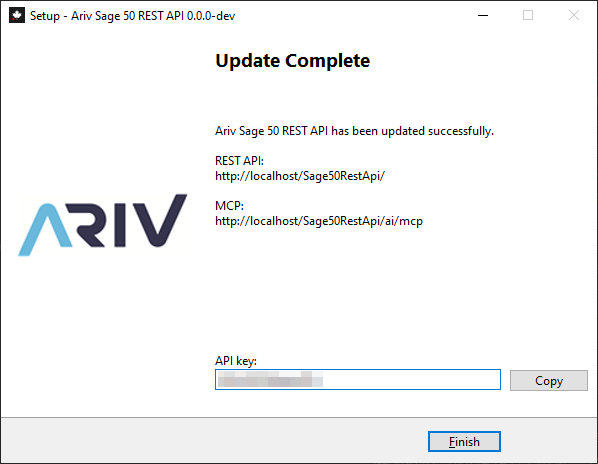
When MCP is included, the completion screen shows:
| Value | Example | What it is for |
|---|---|---|
| REST API | http://localhost/Sage50RestApi/ |
Integrations, Swagger, your own apps |
| MCP | http://localhost/Sage50RestApi/ai/mcp |
Claude, Cursor, Codex, and other MCP clients |
| API key | Copied from the field | Sent as x-api-key for both REST and MCP |
REST and MCP share the same host binding on IIS next to Sage 50, with MCP at the ai child application. They share the same API key.
The MCP URL ends with /mcp. The full path is {your REST path}/ai/mcp (for example /Sage50RestApi/ai/mcp). That is the Streamable HTTP endpoint. Paste that full path into the AI client, not the REST site root alone.
What the MCP server can do
The MCP tools wrap the REST API. An AI client can list and update customers and vendors, create sales and purchases, record payments and receipts, work with employees, currencies, the general ledger and journals, inventory, taxes, and company settings. The same tools can check when Sage last changed each part of the company file (sage50_sync_get_table_status) and list sales or purchase invoices changed since a given time. See Detect changes for incremental sync.
Ask the model in plain language after the client is connected, for example “list customers with a balance” or “create a sales invoice for customer 42”.
Configure the MCP client
You need:
- The MCP URL from the installer
- The API key (use Copy)
- A client that supports remote MCP over HTTP: Cursor, Claude, or Codex
Every client sends the key on each request:
x-api-key: YOUR_API_KEYReplace the sample URL below with yours. The installer provides HTTP URLs. Use those as-is when the AI client runs on the Sage 50 server, or use your HTTPS URL if you have added HTTPS bindings.
Cursor
Add a remote server in .cursor/mcp.json (project) or ~/.cursor/mcp.json (user). Cursor Settings → Tools & MCP also accepts the same JSON.
{
  "mcpServers": {
    "sage50": {
      "url": "https://sage50.company.local/Sage50RestApi/ai/mcp",
      "headers": {
        "x-api-key": "YOUR_API_KEY"
      }
    }
  }
}
Restart Cursor or reload MCP servers after saving.
Claude
Claude Code (CLI):
claude mcp add --transport http sage50 https://sage50.company.local/Sage50RestApi/ai/mcp --header "x-api-key: YOUR_API_KEY"Or a .mcp.json in the project (or ~/.claude.json):
{
  "mcpServers": {
    "sage50": {
      "type": "http",
      "url": "https://sage50.company.local/Sage50RestApi/ai/mcp",
      "headers": {
        "x-api-key": "YOUR_API_KEY"
      }
    }
  }
}
Claude Desktop: add a custom connector with that MCP URL. If your Desktop build does not send custom headers on HTTP yet, use Claude Code or Cursor, or a local mcp-remote stdio wrapper that forwards x-api-key.
Codex
Add a table to ~/.codex/config.toml (or project .codex/config.toml). A url key selects Streamable HTTP. Static headers go in http_headers:
[mcp_servers.sage50]
url = "https://sage50.company.local/Sage50RestApi/ai/mcp"
http_headers = { "x-api-key" = "YOUR_API_KEY" }
Start a new Codex session after editing the config.
HTTP and HTTPS
The installer creates HTTP endpoints on IIS, for example http://localhost/Sage50RestApi/ and http://localhost/Sage50RestApi/ai/mcp. Those URLs work as-is on the Sage 50 server.
When clients connect from another machine, use the HTTPS URL from the installer with a certificate your workstations trust.
Security notes
- Treat the API key like a password. Use Copy on the installer, then store it in the AI client MCP headers configuration.
- REST and MCP share the key. Rotating it updates both.
- Prefer HTTPS with a trusted certificate when the client is not on the Sage 50 server.
- Limit who can reach the REST and MCP endpoints. MCP lets a model create invoices and payments, not only read data.